

How to Import Your Customer List

Importing a list of customers at once is the most efficient way to add your customers to ezbz. We understand that you may not have time to do this and can help you from start to finish.
If you want us to help you, please go to the Customer List Support page or email us at support@ezbz.app.
What is a Bulk Customer List upload? All Admin Users can easily add and edit Customers right in the ezbz.app just as you would add a contact on your phone. Silver and Gold plan Admin Users also have the option to bulk upload a list of customers in a .csv spreadsheet format.
First, you will need to gather your customers’ info on a spreadsheet. You can download a list of your customers if you have these commonly used services:
IMPORTANT!
There are two things you must do
and one thing you should do
before you upload your customer list
- The top row must contain the header titles in the IMPORT CUSTOMER CSV. SPREADSHEET, or the import will not work. *Seriously, they have to match exactly.*
- The spreadsheet must be in .CSV format, or the import will not work.
- Garbage in, garbage out. The data you upload is what the app will use. We recommend reviewing your list carefully prior to upload to ensure that the data is accurate and correct. *There is not a "bulk delete" feature, so it's better to get it right the first time.*
After you have:
- Used the header rows from the IMPORT CUSTOMER CSV SPREADSHEET
- Double checked all of your data
- Saved the spreadsheet in .CSV format
- You are ready to upload your customer list!
Navigate to the Customers menu and tap the “Add Customer” icon in the top right corner. Then, select “Import List”
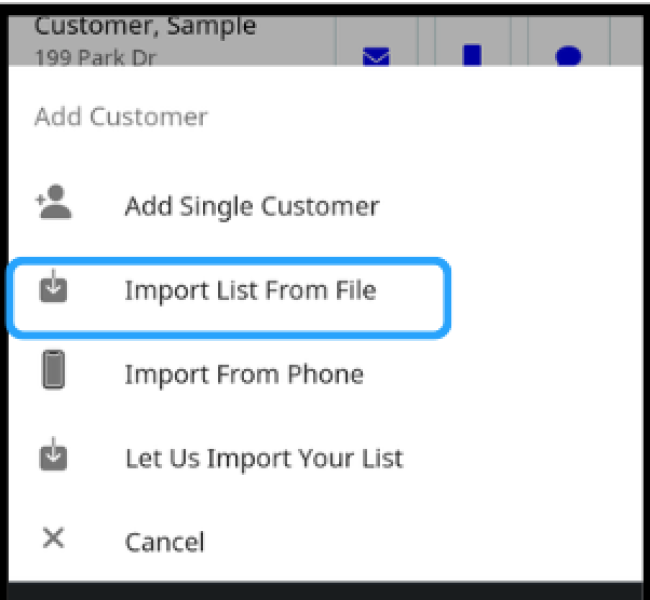
Click the “Upload” button, select the .CSV file on your computer, and click “Open”.

You can check the upload status in the “Import History” menu. If the status is “complete”, you’re good to go!
If Your Import Fails
First, refresh your browser, and then check the Customers menu. Some of the customers may have been imported even if you get a failure status.
Then, double check your spread sheet:
- Is it saved in .CSV format?
- Does every column with data have a header title row?
- Do the titles in the header column exactly match those in the IMPORT CUSTOMER CSV SPREADSHEET?
- Are the column header titles in the exact same order as those in the IMPORT CUSTOMER CSV SPREADSHEET?
If the answer to any of the above question is “no”, you will need to edit your spreadsheet so that the column header titles exactly match those on the IMPORT CUSTOMER CSV SPREADSHEET and save the file in .CSV format.
If the Import History shows a failure status with many more lines than what your sheet has, refresh the browser and check the Customer menu to see if any customer files successfully uploaded. You should copy and paste only the failed data and headers onto a new spreadsheet.
If you’re still having trouble, you can contact us.